Concepts
Generated Layout
The Generated Layout is the output editor. It decides what the generated panel actually looks like.
The key idea
Entry List membership and order do not automatically define the output. Nothing appears until you import or add it into the Generated Layout. Removing a row from the Generated Layout does not delete the source Entry List entry.
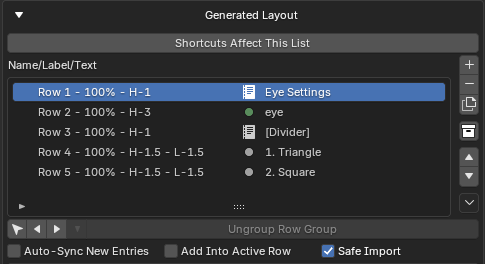
What a layout is made of
| Layout item | What it is |
|---|---|
| Normal entry row | One layout item in its own generated row. |
| Shared row | One generated row holding several entries side by side. |
| Sub-panel | A generated Blender child panel container. |
| Row box | A layout.box() wrapping contiguous rows. |
| Divider | A visual divider between the main panel body and sub-panels. |
These are covered as tasks in Building layouts and Sub-panels.
Two zones: body, then sub-panels
A crucial Blender limitation shapes everything:
Blender always draws child panels below the parent panel body. Loose parent-body rows cannot be interleaved between child panels.
PropUI models this as two zones:
┌─ Generated panel ─────────────┐
│  Main Panel Body              │   ← all loose rows draw here first
│   • row                        │
│   • shared row                 │
│   • row box                    │
├───────────────────────────────┤
│  Sub-Panels                    │   ← child panels always come after
│   ▸ Sub-panel A                │
│   ▸ Sub-panel B                │
└───────────────────────────────┘
You cannot put a loose row after a sub-panel — Blender does not allow it. Move that row into a sub-panel instead.
Keeping it in sync with the Entry List
Because the two layers are independent, PropUI gives you sync options to bridge them:
- Auto-Sync New Entries: new Entry List entries are added to the layout automatically.
- Safe Import: prevents importing the same entry into the layout twice.
- Import / Replace Import: append the Entry List into the layout, or clear and rebuild it once from the current Entry List order.
Advanced structure
- Shared rows put multiple entries in one row, with per-entry column weights and hidden-child behavior.
- Row boxes wrap contiguous rows in a box, and can nest when ranges are fully contained.
- Sub-panels become native Blender child panels, nestable up to depth 12.
See the layout limits for the exact rules around nesting, overlaps, and empty sub-panels.