Concepts
Entry List
The Entry List is the authored source list — the controls you create and organize. It can be hierarchical (parents and children), and its order can be completely different from the generated output order.
The key idea
The Entry List is what you author. It does not define the output by itself. Entries only appear in a panel once they are added to the Generated Layout. Hiding or removing an Entry List row never deletes a generated panel.
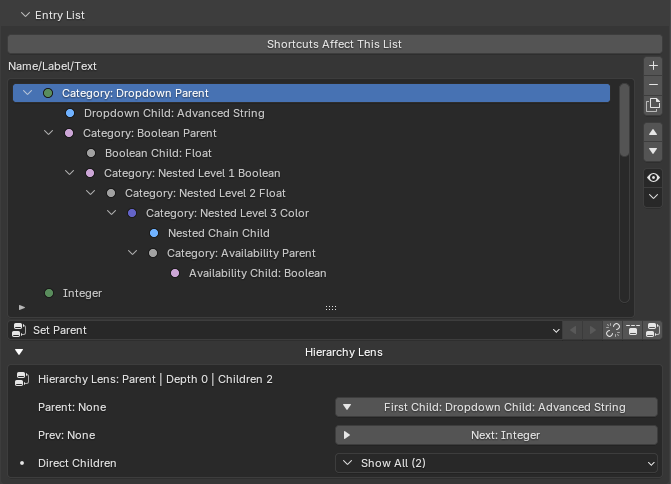
Hierarchy
Entries can be nested into a tree:
- Parent entries can be expanded or collapsed in the editor.
- Children are indented when tree hints are enabled.
- Hierarchy depth is capped at 12 levels.
A parent/child relationship is what unlocks Conditions — a child can show, hide, enable, or disable itself based on its parent's value.
What lives on a row
Depending on your Primary Display setting and the entry type, inline editing a row changes its label, editor label, or Property ID. Several useful labels can exist on one entry:
- Editor Label: an editor-only name for the list. It does not affect the generated UI or the custom-property key.
- Label / Text / Button Text: the text shown in the generated panel.
- Property ID: the managed custom-property key (Float, Integer, Boolean, and Array entries only).
Selection and hiding
- Shift-click selects a range; Ctrl-click toggles selection.
- The Hide menu hides entries from the editor list by active entry, type, parents, children, selected-only, or all.
- Hidden-in-editor entries are hidden only from the editor. They are not deleted, and their generated output is still governed by the Generated Layout and conditions.
What you can do with it
The Entry List has tools for adding, removing, duplicating, reordering, and re-parenting entries, plus a Hierarchy Lens for navigating the tree. Those are covered as tasks in the manual:
And every entry type and its options: