
Clean Blender control panels, built visually
izom PropUI turns custom properties, rig controls, operators, and RNA-addressable
Blender values into readable panels. Build the controls visually, arrange the
layout, then generate a real Blender UI that lives in your .blend.
What it solves
Blender custom properties are powerful, but the default presentation is usually a plain list: awkward labels, fixed ordering, and controls scattered across the file. PropUI gives those values a designed interface without making you write a panel by hand.
Use it for rig controls, animation-facing sliders, material and modifier setups, tool buttons, object settings, and any project where the UI should be cleaner than the raw data underneath.
Why it exists
PropUI started from a rigging problem: the controls worked, but the interface around them did not. Driver-safe property IDs, readable labels, custom ordering, grouped controls, and animator-friendly sliders all wanted a real panel. Writing that panel by hand for every project was the part that needed to disappear.
The workflow
-
Author
Add entries for values, labels, custom RNA paths, display links, and operator buttons.
-
Arrange
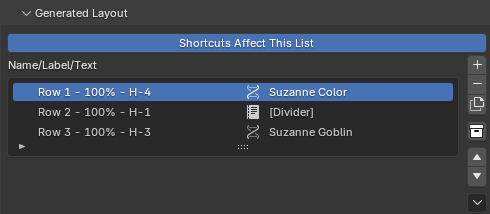
Build the output layout with rows, shared rows, row boxes, and sub-panels.
-
Generate
Write a standalone Blender panel stored in the
.blend, or export portable.pyfiles.
Generate
Author the setup as a list, generate it as a working Blender panel.
Watch the tutorial
Choose your edition
Free
izom PropUI Free
$0 - core workflow
One Object-based 3D Viewport sidebar panel with Float, Integer, Boolean, Array, and Text entries.
Full
izom PropUI
Paid - complete toolkit
All entry types, flexible storage, panels across Blender, UI variants, shortcuts, branding, generated-UI management, and import/export.
Rigify
izom PropUI Rigify
Paid - Rigify feature set
Author the rig control UI on your metarig and let Rigify generate it into its native panel or a dedicated PropUI panel.
In practice
Where to go
-
Choosing or buying
Compare editions, check requirements, and find the store links.
-
Learning PropUI
Start with the docs landing page and follow the path for your edition.
-
A real example
Build a toggle that swaps one color value between two generated displays.