🔄 Sync, Cleanup, and Reset
Tools for pushing properties to the metarig, cleaning up old properties, and fully resetting the setup.
Sync to Metarig

Sync operations can push all managed properties or only the selected entry back onto the metarig.
Sync to Metarig creates or updates the real metarig custom properties from your izom.PropUI editor setup.
Sync modes:
- Sync All Managed to Metarig — pushes every managed entry.
- Sync Selected to Metarig — pushes only the active entry.
During sync, TEXT entries are skipped (they don't create real custom properties). Values are created or updated on the resolved target bone, duplicate prop IDs are auto-renamed, existing values are reused when possible and clamped into authored ranges, UI metadata is recreated, and library-overridable state is applied.
Move Matching Props Between Bones: when enabled, matching managed props found on the host bone or selected prop bone can be moved to the chosen sync target bone.
Sync remembers the last synced managed property IDs per target bone.
Clean Host and Clean Prop Bone
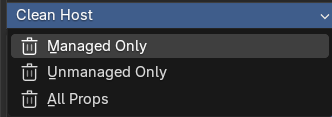
Cleanup menus can target managed props only, unmanaged props only, or the entire property set.
Clean menus remove custom properties from the metarig. They can target the Host Bone or the Prop Bone.
| Clean mode | What it removes |
|---|---|
| Managed Only | Only property IDs currently managed by this izom.PropUI setup |
| Unmanaged Only | Only native props not managed by the current setup |
| All Props | All custom properties except internal/Rigify-reserved data |
⚠️ Remove All Entries vs. Nuke
These two operations differ significantly in scope:
| Remove All Entries | Nuke | |
|---|---|---|
| Clears Entry List | Yes | Yes |
| Clears Generated Layout | Yes | Yes |
| Clears Row Boxes | No | Yes |
| Clears selection/collapse state | No | Yes |
| Resets heading settings | No | Yes |
| Resets top-level options to defaults | No | Yes |
| Clears raw-copy settings | No | Yes |
| Removes synced custom props from host/prop bone | No | Yes |
| Keeps broader rig settings intact | Yes | No |
Nuke is destructive
Nuke is a full reset for the host bone. It requires confirmation and cannot be undone.
Nuke Reset Defaults
When Nuke runs, it resets all major settings to these values:
| Setting | Reset value |
|---|---|
| Managed heading | Blank / disabled / neutral styling |
| Native heading | "Native Props" / enabled / neutral styling |
| Native section position | Below Managed |
| Overwrite native custom properties | True |
| Transfer unmanaged native to prop bone | True |
| Show unmanaged native in generated UI | True |
| Use One Prop Bone | False |
| Prop bone name | Empty |
| Move matching managed props | True |
| Last synced prop IDs | Cleared |
| Editor settings expanded | False |
| Editor float decimals | 3 |
| Hide rig UI section | False |
| Hide custom prop section | False |
| Hide basic raw_copy section | False |
| Use basic.raw_copy | False |
| Generated Layout auto-sync | False |
| Generated Layout add into active row | False |
| Generated Layout safe import | True |
| Relink constraints | False |
| Parent bone | Empty |
| Optional widget type | Empty |