Overview
An introduction to the feature set, its core terminology, and what it covers.
What izom.PropUI Is
izom.PropUI is a Rigify feature set for authoring custom animator properties from a metarig bone and generating a structured rig UI for them. The rig type is izom.PropUI.
The core workflow is straightforward:
- You author an Entry List on a metarig pose bone.
- Each entry can be a float, integer, boolean, or text-only row.
- When Rigify generates the rig, izom.PropUI creates the real custom properties and assembles a structured Rig UI panel for them.
- You can refine the UI with parenting, conditional visibility and availability, value-driven labels, layout editing, section headings, and native-property passthrough.
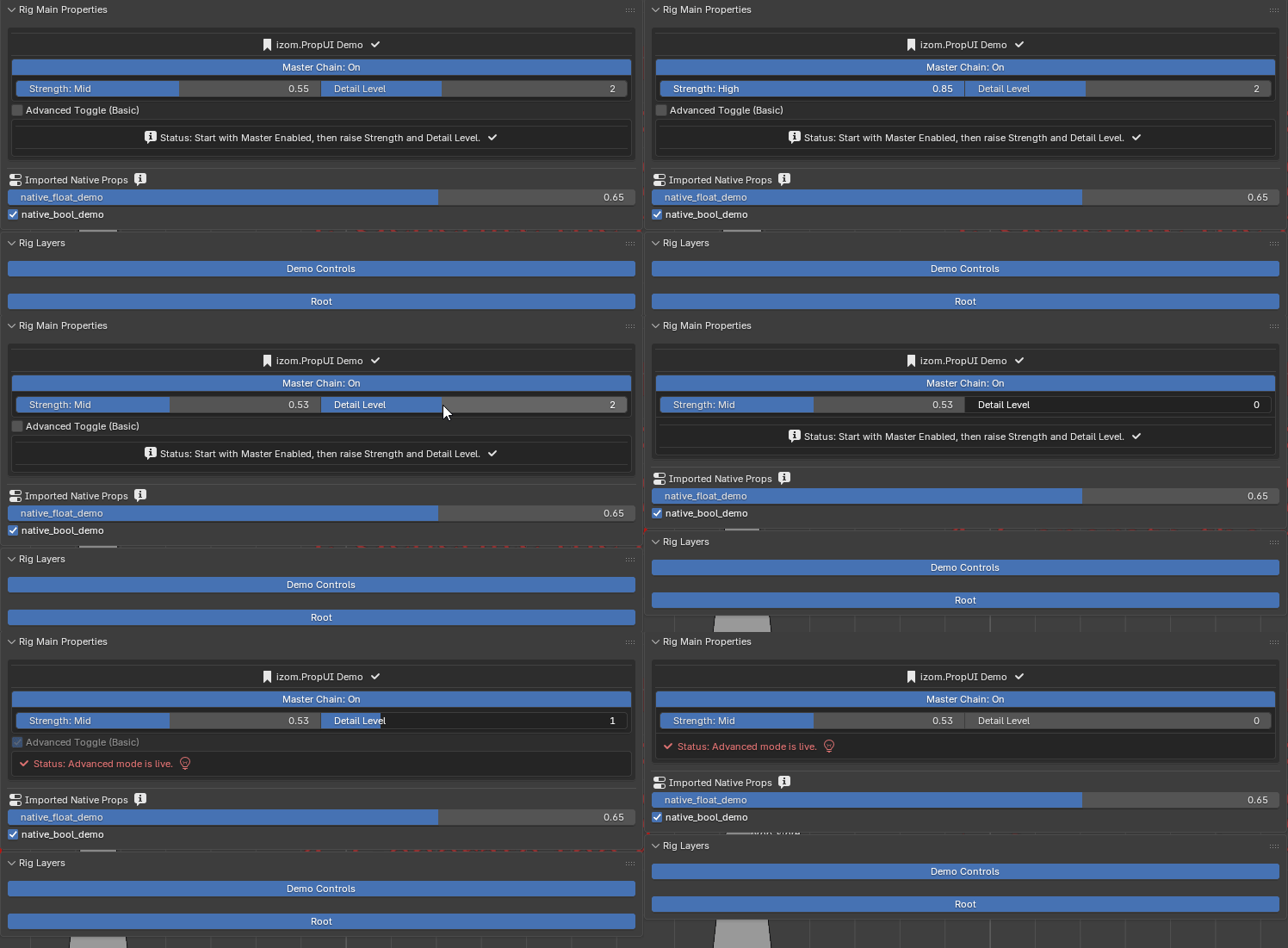
Generated rig UI preview from the demo setup.
🔍 Walking through the demo
The gif above shows a fully generated rig UI built from the demo scene. Here's how each piece was authored:
-
"izom.PropUI Demo ✓" — This is the managed section heading, enabled and given a title. The checkmark is a before icon set on the heading.
-
"Master Chain: On" — A BOOL entry acting as a parent for the entries below it. Its per-state label shows "On" when enabled. It controls child visibility and availability for the entries underneath.
-
"Strength: Mid" and "Detail Level: 2" — These sit on a shared row in Generated Layout (two entries grouped into one row). "Strength" is a FLOAT entry (value 0.55) with per-value labels — the label "Mid" comes from a value-bucket threshold. "Detail Level" is an INT entry. Both are children of "Master Chain" and would hide if the master toggle were turned off.
-
"Advanced Toggle (Basic)" — A BOOL entry that appears grayed out. It has a child availability rule tied to its parent, making it disabled under certain conditions. The "(Basic)" text comes from a per-state label or per-other-entry label rule.
-
"ℹ Status: Start with Master Enabled..." — A TEXT entry with a before icon (ℹ) and conditional text driven by another entry (Per Other Entry State/Value Text). The displayed text changes based on the current state of other entries in the setup.
-
"Imported Native Props" — The native passthrough section, with its own section heading. Below it,
native_float_demoandnative_bool_demoare unmanaged native properties that pass through because Overwrite Native Custom Properties is off and Show Unmanaged Native Props In Rig UI is on.
This entire UI was generated automatically from the Entry List and Generated Layout authored on a single metarig pose bone.
📖 Core Terms
- Host bone
- The metarig pose bone carrying the izom.PropUI parameters.
- Generated host / control bone
- The generated control used by the rig. In normal mode this is a copied CTRL bone. In embedded basic.raw_copy mode it can keep the original name.
- Managed properties
- The non-text Entry List items authored by izom.PropUI. These are the custom properties izom.PropUI creates, updates, syncs, and can clean up.
- Unmanaged native properties
- Existing custom properties found on the source metarig pose bone that are not managed by the current izom.PropUI Entry List.
- Prop bone
- An optional target bone used by One Prop Bone mode. Managed props can live on this separate generated bone while the UI still belongs to the host control.
- Entry List
- The source authoring list for managed properties and text rows.
- Generated Layout
- A separate editor that controls row order, row grouping, and column placement for the generated Rig UI without changing the Entry List itself.
- Value labels
- Rules that change a displayed label or text block based on numeric thresholds or another entry's state/value.
- Embedded basic.raw_copy mode
- An izom.PropUI mode that embeds basic.raw_copy-style behavior into this rig so the bone is copied through in a raw-copy way while still using izom.PropUI.
High-Level Feature Areas
Below is a grouped summary of everything the feature set currently includes.
📋 Entry types and authoring
- Float, Integer, Boolean, and Text entry types
- Entry List authoring with multi-select, range select, hide/show, collapse, move, duplicate, import, and removal
- Type defaults saved per entry type
- Copy settings between same-type entries
🔗 Hierarchy and conditional logic
- Parent / child hierarchy in the Entry List
- Child visibility rules
- Child availability (enable/disable) rules
- Inheritance depth for visibility / availability rules
🏷️ Dynamic labels and text
- Dynamic labels for numeric values
- Dynamic labels for boolean states
- Conditional labels driven by another entry
- Conditional text driven by another entry
- Text-block styling system
🎨 Layout and display
- Generated Layout row editor
- Generated Layout row grouping and columns
- Generated Layout Row Boxes
- Managed section heading system
- Native section heading system
🦴 Native properties and bones
- Native custom-property passthrough
- Native passthrough section ordering
- Overwrite-native mode
- One Prop Bone mode
- Transfer unmanaged native props to prop bone
🔄 Sync and maintenance
- Metarig import / sync / cleanup workflows
⚙️ Advanced modes
- Embedded basic.raw_copy mode
- Constraint relinking for raw-copy mode
- Parent relinking for raw-copy mode
- Raw-copy widget override
🛠️ Editor features
- Validation / pre-generation checks
- Editor-only float precision controls
- Shared keyboard shortcut system with switchable target list
- Nuke / full reset