🎛️ Main Panel
The main rig parameter panel is the top-level editing surface for izom.PropUI. It holds global settings, section headings, validation, and the collapsible editors for entries, layout, and raw-copy mode.
Top-Level Rig Panel

The top-level panel lets you switch which editing surface the shared shortcut system targets.
The main panel contains the following controls:
- Shortcuts Affect menu
- Managed Section Heading controls
- Pre-Generation Checks validation box
- Overwrite Native Custom Properties
- Show Unmanaged Native Props In Rig UI
- Native Props Section controls
- Use One Prop Bone and Prop Bone picker
- Transfer Unmanaged Native Props To Prop Bone
- Sync to Metarig menu operator
- Move Matching Props Between Bones
- Clean Host / Clean Prop Bone menus
- Collapsible sections: Entry List, Selected Entry, Generated Layout, Use basic.raw_copy, Editor Settings
Default settings
| Setting | Default |
|---|---|
| Managed section heading | Disabled |
| Native section heading | Enabled |
| Native section title | "Native Props" |
| Native section position | Below managed section |
| Overwrite Native Custom Properties | Enabled |
| Show Unmanaged Native Props In Rig UI | Enabled |
| Use One Prop Bone | Disabled |
| Transfer Unmanaged Native Props To Prop Bone | Enabled |
| Move Matching Props Between Bones | Enabled |
| Generated Layout Auto-Sync New Entries | Disabled |
| Generated Layout Add Into Active Row | Disabled |
| Generated Layout Safe Import | Enabled |
Managed Section Heading
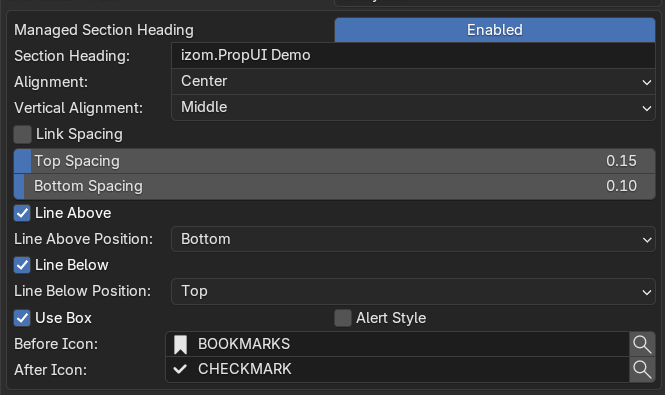
Managed section heading styling includes title text, alignment, spacing, lines, icons, box mode, and alert styling.
The managed section heading is the optional heading shown above the managed izom.PropUI section in the generated Rig UI. It can be enabled or disabled independently of the managed entries themselves.
Styling options: section heading text, alignment, vertical alignment, link spacing, linked spacing editor, top spacing, bottom spacing, line above, line above position, line below, line below position, use box, alert style, before icon, after icon.
Behavior
- If disabled, managed entries still render normally; only the heading is skipped.
- If Use Box is on, the heading and the entire section's content are wrapped in a box.
- If Alert Style is on and Use Box is off, the heading row itself is drawn in alert style.
- Section title input is limited to 255 characters.
Native Props Section Heading
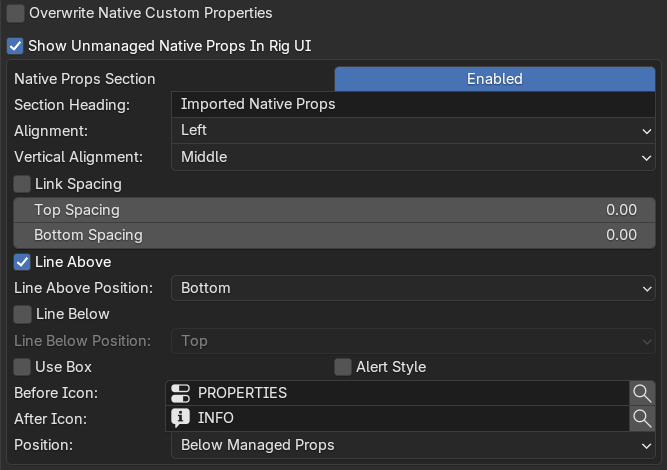
Native props section controls cover heading styling, overwrite behavior, and whether unmanaged native props appear above or below the managed block.
The native section heading is the heading used for unmanaged native custom properties when they are shown in the generated Rig UI. It supports the same styling options as the managed section heading, plus one additional setting:
- Position — Below Managed Props or Above Managed Props
Behavior
- This section only matters when unmanaged native props are actually being shown.
- If overwrite-native mode is on, unmanaged native props are not shown and this section effectively disappears from the output.
✅ Pre-Generation Checks
The panel can draw a "Pre-Generation Checks" validation box that flags potential issues before you generate.
| Check | Result |
|---|---|
| Blank Property IDs on non-text entries | Auto-filled during normalization |
| Duplicate Property IDs | Auto-renamed during sync or generation |
| Broken parent links | Entries fall back to root level after normalization |
| Generated Layout items referencing deleted entries | Pruned on normalization |
| Duplicate Generated Layout Row Boxes | Ignored until fixed |
| Partially overlapping Generated Layout Row Boxes | Ignored (only nested or disjoint boxes are supported) |
| Other-entry rule rows referencing deleted entries | Rules stop matching until reassigned |
| One Prop Bone enabled with no Prop Bone | Falls back to the host bone |
| One Prop Bone pointing back to the host bone | Setting has no effect |
| One Prop Bone target missing on the metarig | Falls back to the host bone |
| Widget Type set in raw_copy mode on a non-control bone | Widget override is ignored |