🔗 Hierarchy and Rules
How entries relate to each other through parent-child relationships, and how those relationships drive conditional visibility and availability in the generated rig UI.
Hierarchy and Parenting
Each entry carries a stable internal UID and an optional parent UID. Entries can form trees up to 8 levels deep, and the following structural operators are available:
- Set Parent (direct picker), Clear Parent
- Indent Entry, Outdent Entry
- Unparent Direct Children
- Unparent All Children / Descendants
Generation scope
Hierarchy is used both for editor organization and for child visibility/availability logic. Generated visibility/availability inheritance only works through ancestors that actually exist in the generated Rig UI scope — if an ancestor is missing from the generated output, its rule cannot be applied.
Auto behavior
When a child is parented under a numeric (FLOAT/INT) parent, its shared-row hidden mode is automatically set to Keep Empty Slot (RESERVE_SLOT). This is a stability helper for shared numeric-parent conditions.
👁️ Child Visibility Rules
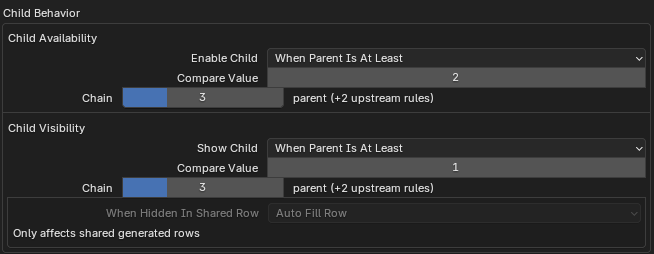
Parent-child rule controls handle visibility, availability, inheritance depth, and shared-row hidden behavior.
Visibility rules determine whether a child entry is shown at all in the generated UI. The available modes depend on the parent's type.
Boolean parent modes: Always, When Parent Is On, When Parent Is Off.
Numeric parent modes (FLOAT / INT):
| Mode | Condition |
|---|---|
| Always | Always visible |
| When Parent Equals | parent == value |
| When Parent Is At Least | parent >= value |
| When Parent Is At Most | parent <= value |
| When Parent In Range | min <= parent <= max |
Note
All numeric comparisons are inclusive — At Least, At Most, and Range all include the boundary value.
Visibility inheritance depth
Inheritance depth lets an entry chain multiple ancestor visibility rules. A depth of 1 means only the direct parent's rule applies. A depth of 2 adds the parent's own rule, and higher values add more upstream rules.
The UI summarizes this as: none, parent, parent (+parent's rule), or parent (+N upstream rules).
🔒 Child Availability Rules
Availability rules work identically to visibility rules but control whether a child entry is enabled (interactive) rather than whether it is shown. The same comparison modes and semantics apply:
Boolean parent modes: Always, When Parent Is On, When Parent Is Off.
Numeric parent modes (FLOAT / INT): Always, When Parent Equals, When Parent Is At Least, When Parent Is At Most, When Parent In Range. All numeric comparisons are inclusive, just like visibility.
Availability inheritance depth
Same model as visibility inheritance — controls how many ancestor levels of availability rules are evaluated (1 = parent only, 2 = parent + parent's rule, and so on).
Shared Row Hidden Mode
When an entry is part of a shared generated row and child visibility hides it, this setting controls what happens to its slot.
- Auto Fill Row (
FILL_ROW) - The row collapses that slot and the remaining entries re-pack to fill the gap.
- Keep Empty Slot (
RESERVE_SLOT) - The entry keeps an empty slot so the row layout stays stable.
Tip
This only matters in shared rows. When a child is under a numeric parent, izom.PropUI defaults new children to Keep Empty Slot for stability. The editor warns that same-row numeric parents can make Auto Fill Row jump — Keep Empty Slot is safer in that situation.