🏷️ Dynamic Labels and Text
izom.PropUI includes five independent systems for changing displayed labels and text at runtime based on entry values, states, and other entries.
Dynamic Label and Text Systems
System A: Boolean per-state labels
Used by boolean entries. You choose alternate labels for the off and on states.
System B: Numeric per-value labels
Used by float and integer entries. Different labels can be assigned at different numeric thresholds.
System C: Other-entry-driven entry labels
Used by any entry that enables Per Other Entry State/Value Labels. Another entry's state or numeric value can override this entry's label.
System D: Text other-entry rules
Used by text entries via Per Other Entry State/Value Text. Another entry's state or numeric value can override the displayed text and optionally the whole text style.
System E: Value-bucket nested other-entry rules
Used inside numeric value buckets. After a value bucket is chosen, another entry can further refine the result.
Numeric Per-Value Labels
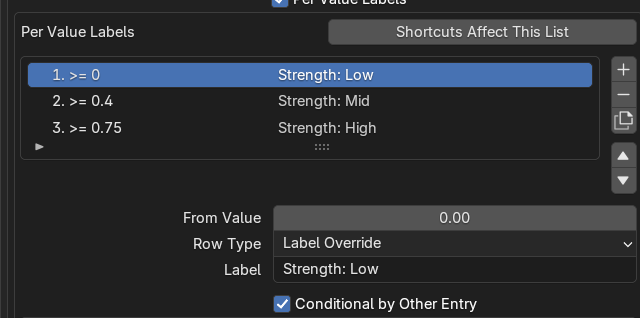
Numeric per-value labels let float and integer entries show different labels at different thresholds.
Numeric per-value labels are available on FLOAT and INT entries through Per Value Labels. Each row stores a threshold, a label, an optional nested conditional-by-other-entry rule, and a rule kind.
Threshold matching
Thresholds are inclusive — the highest threshold at or below the current value wins. In code terms, matching is compare_value >= threshold.
Example: with thresholds 0, 5, and 10, a current value of 7 selects the bucket at threshold 5.
📌 Order matters
Per-value label rows are evaluated by their threshold value (highest matching wins). When thresholds have nested conditional-by-other-entry rules, list order is only used as a tiebreaker when multiple nested rules are matching simultaneously at runtime — the earlier matching source entry wins. Within the same source entry, the highest matching threshold still wins. If no nested rule matches, the bucket's own label is used.
Fallback rows reset to the current fallback label for that rule set instead of supplying a label.
Threshold uniqueness: thresholds are normalized and kept unique within the applicable scope. If no unique threshold remains in the allowed range, add/duplicate can be refused.
Keyboard shortcut target: Per Value Labels.
Boolean Per-State Labels
Boolean per-state labels are available through Per State Labels, with two fields: When Off and When On.
If a state label is blank, it falls back to the entry's base label or prop ID fallback. The resolution order on BOOL entries is: base label, then per-state label, then entry-level other-entry label rules can refine it further.
Per Other Entry State/Value Labels
This system is available through Per Other Entry State/Value Labels and lets another entry control this entry's displayed label.
Supported source types: BOOL, FLOAT, and INT entries.
| Source type | Rule | Matching |
|---|---|---|
| BOOL | source_bool_state | When Off / When On |
| FLOAT / INT | source threshold | Inclusive — matches when source_value >= threshold |
Rule kinds: Label Override or Fallback. A fallback returns to the general label.
📌 Order matters
When multiple other-entry label rules are defined, list order is only used as a tiebreaker when multiple rules are matching simultaneously at runtime. If only one rule matches, it wins regardless of position. For example, position 1 FLOAT entry >= 0.5 → "dog" and position 2 INT entry >= 5 → "cat": if both match, "dog" wins because it appears first; swap them and "cat" wins instead. Within the same source entry, the highest matching threshold still wins. You can reorder rules using the move operators or keyboard shortcuts.
Per Other Entry State/Value Text
This system is available only on TEXT entries through Per Other Entry State/Value Text. It uses value-label style rows but for text display.
A text rule can override only the displayed text, or — when Override Display Style is enabled — override the entire text style: text, alignment, body mode, linked spacing, vertical alignment, top/bottom spacing, lines and line positions, use box, alert style, and before/after icons.
A fallback row restores the base text block.
📌 Order matters
Text other-entry rules use list order only as a tiebreaker when multiple rules are matching simultaneously at runtime. If only one rule matches, it wins regardless of position. For example, position 1 FLOAT entry >= 0.5 → "dog" and position 2 INT entry >= 5 → "cat": if both match, "dog" wins because it appears first; swap them and "cat" wins instead. Within the same source entry, the highest matching threshold still wins. If no rule matches, the base text block is shown. Reorder rules to control priority.
Keyboard shortcut target: Per Other Entry Value Text.
Conditional by Other Entry Labels
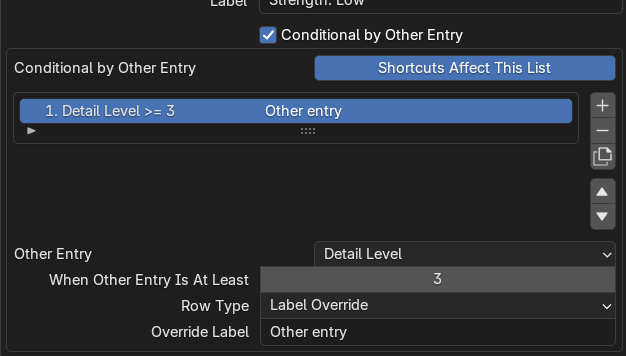
Conditional-by-other-entry rules let one entry change its label based on another entry's value or state.
This is the nested rule system available inside numeric value buckets. It lets a chosen value bucket be further conditioned by another entry.
Supported source types: BOOL, FLOAT, and INT entries.
For BOOL target entries, nested rules also have an Applies When / target_bool_scope setting: Any, When Off, or When On.
A bucket-level nested fallback returns to the current bucket label.
Keyboard shortcut target: Conditional by Other Entry Labels.
Dynamic Label and Text Resolution Order
The resolution order depends on entry type:
- Start from the base label.
- Apply per-state label if enabled.
- Apply entry-level other-entry label rules; if multiple source-entry rules are matching simultaneously, the earlier matching entry in the list wins, while within the same source entry the highest matching threshold still wins.
- Start from the base label.
- Choose the highest matching value bucket if enabled; apply that bucket's label or fallback.
- Apply that bucket's nested other-entry rules; if multiple source-entry rules are matching simultaneously, the earlier matching entry in the list wins, while within the same source entry the highest matching threshold still wins.
- Apply entry-level other-entry label rules; if multiple source-entry rules are matching simultaneously, the earlier matching entry in the list wins, while within the same source entry the highest matching threshold still wins.
- Start from the base text block.
- Scan text other-entry rules; if multiple source-entry rules are matching simultaneously, the earlier matching entry in the list wins, while within the same source entry the highest matching threshold still wins.
- A fallback restores the base text block.
- A style override can replace the entire block style.
Note
Tooltips always stay at the base tooltip — they are not dynamically swapped.