⚙️ basic.raw_copy Mode
izom.PropUI can embed basic.raw_copy-style behavior, letting the bone copy through in a raw-copy way while still using izom.PropUI for property management and UI generation. This is useful when you need the generated control to keep the original metarig bone name and want to manually manage ORG/MCH/DEF bones.
Embedded basic.raw_copy Mode
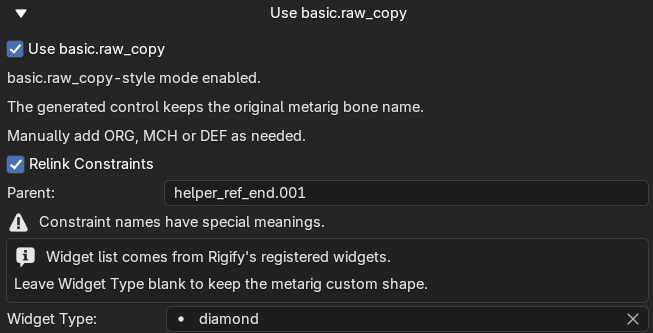
Embedded basic.raw_copy mode keeps raw-copy-style behavior while exposing constraint relinking, parent relinking, and widget options.
Enable this mode with the Use basic.raw_copy toggle. When active:
- The generated control keeps the original metarig bone name.
- You manually add ORG, MCH, or DEF bones as needed.
- All izom.PropUI property management and UI generation still works normally.
Additional options: Relink Constraints, Parent, Widget Type.
Constraint Relinking
Constraint relinking allows copied constraints to be redirected to the correct generated targets after generation.
How it works
The system looks for @ markers in constraint names. The suffix after @ is treated as the relink target specification.
Examples: Copy Rotation@CTRL, Track To@DEF, Stretch To@spine_fk.L
Supported relink specs: exact bone name, CTRL, DEF, MCH.
Armature constraints can use a single @ spec that repeats to all targets, or multiple @ specs if the target count matches the constraint target count.
Parent Relinking
The Parent field is part of the same raw-copy relink flow. After generation, it replaces the generated bone's parent.
Supported parent specs: exact bone name, CTRL, DEF, MCH.
Note
Parent relinking is only used when Relink Constraints is enabled. If a parent spec is given, izom.PropUI disables auto-parenting for that bone and rewrites the parent after bones are created.
Widget Type
The Widget Type setting is only meaningful in embedded basic.raw_copy mode on control bones.
- The widget list comes from Rigify's registered widgets.
- If blank, the metarig custom shape is preserved.
- If a widget type is set, a fresh registered widget is created.
Warning
If the bone is not a control bone, widget override is ignored and validation warns about it. In normal (non-raw-copy) mode, the generated output widget is always a circle widget.